October 26, 2026 | AI ERP | Dynamics 365 Project Operations | Expense Agent | Preview Feature | 5 min read
Expense Agent Overview (Preview) in Dynamics 365 Project Operations
Expense reporting is one of the most frequent and frustrating tasks for employees and finance teams. Despite its importance, the process often remains manual and error-prone, relying on users to interpret receipts, enter data and navigate complex policies: How can AI simplify this reporting burden and deliver cleaner data?
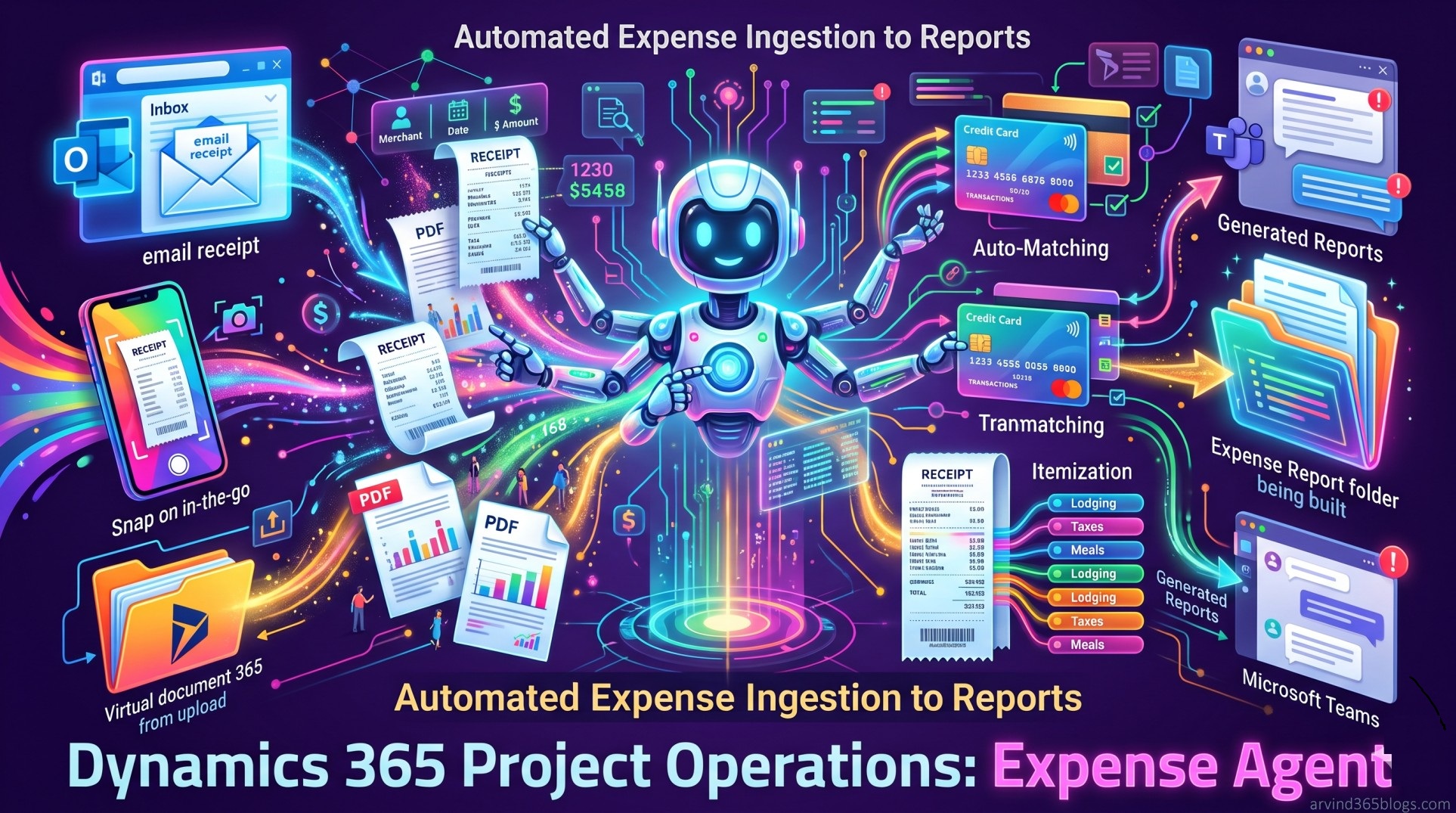
Microsoft has introduced the Expense Agent (Preview) for Dynamics 365 Project Operations. Powered by AI, Expense Agent automates the end-to-end expense management workflow by using intelligent automation to handle receipt processing, expense line creation, matching, itemization and report generation.
This production-ready preview feature applies specifically to Dynamics 365 Project Operations Integrated with ERP and Dynamics 365 Project Operations for manufacturing.
Core Functionality Workflow
Traditional expense processes place a heavy burden on users to extract details, choose categories and fix errors. Expense Agent replaces this with an automated sequence:
Receipt Ingestion → Auto-Create Lines → Auto-Match Credit Cards → Itemization → Report Generation → Teams Review & SubmitThis guided, AI-driven process reduces guesswork and helps ensure expenses are completed accurately the first time.
1. Flexible Receipt Ingestion
Expense Agent supports multiple ways to capture and upload receipts from wherever employees work:
- Outlook (Shared Mailbox): Employees forward receipts directly to a designated shared mailbox. The agent monitors the inbox, extracts key details (merchant name, date, amount, currency) and automatically generates expense lines.
- Expense Mobile App: Designed for on-the-go workers to capture or upload receipts directly without waiting to access a laptop.
- Dynamics 365 Finance & Operations: In-app uploads are monitored by the agent, converting unattached receipts into expense lines with minimal manual effort.
Employees can focus on their work while finance teams benefit from cleaner, more compliant expense data.
2. Automated Line Creation & Auto-Matching
When an image or PDF receipt is uploaded, Expense Agent analyzes the document to identify core transaction details - merchant name, date, currency and total amount - and prepopulates the line fields.
Beyond raw extraction, the agent applies contextual intelligence to infer the most appropriate expense category and suggest descriptions.
Additionally, the Auto-Match feature evaluates receipts against existing corporate credit card transactions in the system, automatically linking receipts to the matching transactions to avoid duplicate lines and manual reconciliation.
3. Intelligent Multi-Line Itemization
Multi-line expenses (such as hotel bills with room rates, taxes and fees or meals with multiple charges) are traditionally tedious to itemize.
Receipt Upload → Analyzes Items, Taxes & Tips → Creates Itemized Lines → Maps to Defined SubcategoriesExpense Agent evaluates individual line items, amounts, taxes, tips and totals on the receipt, breaking them into itemized expense lines based on company-defined categories and subcategories.
4. Report Generation & Review in Microsoft Teams
The system organizes related expense lines into reports structured logically by project or trip:
- Calendar-Driven Grouping: If employees share their work calendar with the shared mailbox, the agent can use calendar details to identify relevant trips or projects for the report schedule.
- Interactive Teams Interface: Generated reports appear in Microsoft Teams, allowing users to review entries, attach or detach lines and update categories.
- Policy Violation Alerts: Teams alerts users if any expense lines violate policies configured in Finance and Operations apps.
- Submission Choices: Users can submit reports for approval directly within Teams or choose "Open in Expense" to edit and submit directly in Finance and Operations apps.
Known Limitations to Keep in Mind
Because Expense Agent is in preview, Microsoft outlines specific considerations and limitations:
1. Manual Verification May Be Required
While effort is significantly minimized, users still need to review and verify extracted data to ensure final compliance and accuracy.
2. Dependency on Receipt Quality
Illegible receipts or receipts missing critical values (merchant name, location, amount or currency) cannot be processed. Users receive notifications when receipts fail processing.
3. Report Title & Grouping Adjustments
Titles are automatically generated based on associated trips, projects or locations (e.g., city or country/region). Users can adjust titles or detach and reorganize lines in Finance and Operations apps if needed.
4. Category Suggestions
The agent suggests categories (such as Flight, Meal or Car Rental) based on best match. If the mapped category is unsuitable, users can update it in Teams or Finance and Operations prior to submission.
Expense Agent brings intuitive, guided assistance into expense reporting - reducing manual effort, improving accuracy and streamlining the end-to-end journey from receipt to approval.