October 2, 2026 | Artificial Intelligence | 5 min read
AI Agents: From Idea to Action
AI has moved beyond simply answering questions.
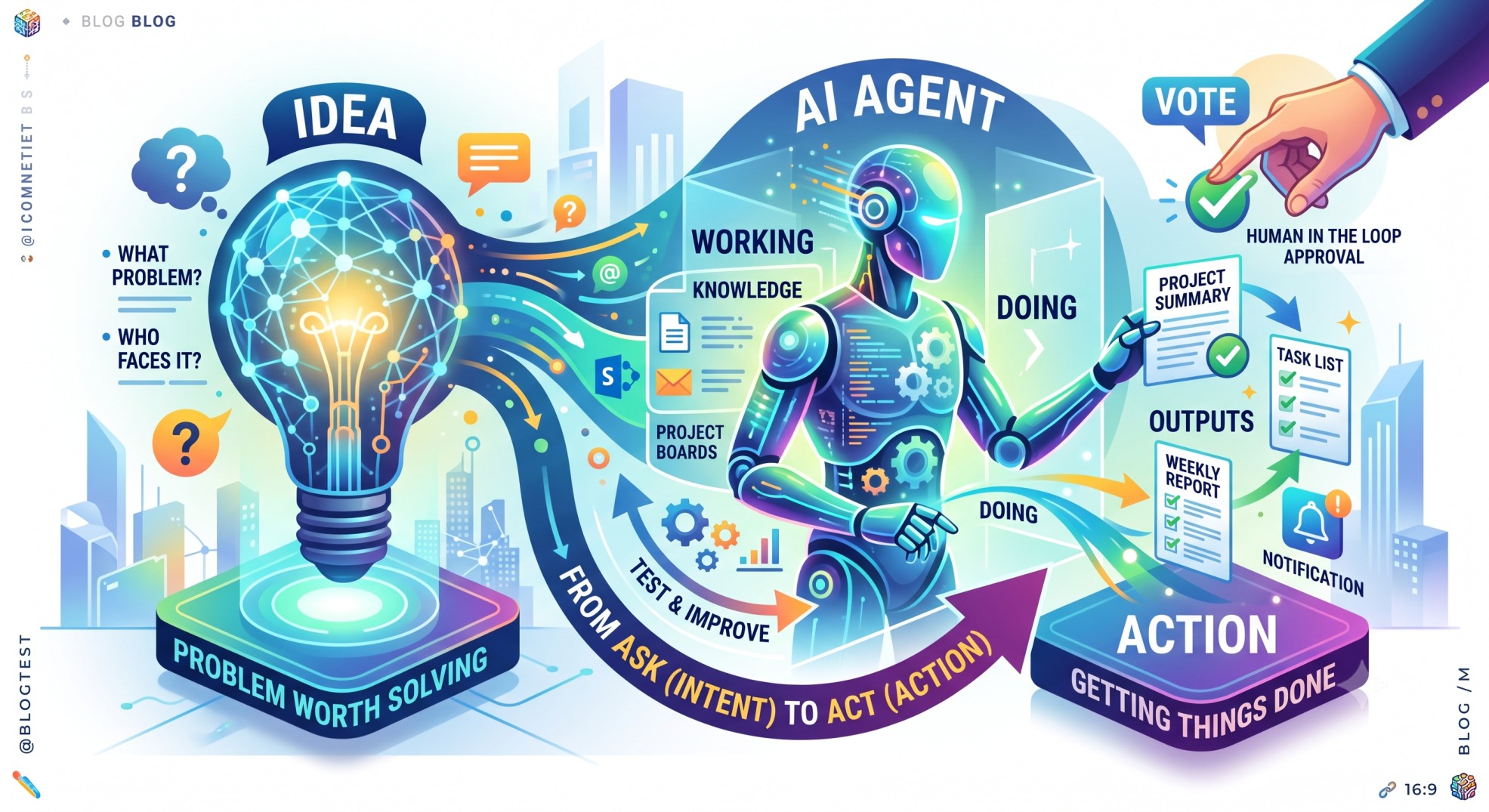
Today, we are increasingly talking about AI agents - AI systems that can understand a goal, work with information and take actions to complete a task.
I find this particularly interesting because it changes how we think about building software.
Instead of asking only:
“What can AI tell me?”
we can start asking:
“What can AI help me accomplish?”
Microsoft published a simple guide on how anyone can start building an AI agent, even without writing code. The approach is straightforward and focuses on starting with the problem rather than the technology.
What is an AI Agent?
A traditional AI chatbot is very good at answering questions.
You ask something.
It gives you an answer.
An AI agent can go one step further.
It can potentially:
- Understand a goal
- Find relevant information
- Make decisions within defined boundaries
- Perform tasks
- Connect with other systems
- Produce an output
- Continue working toward a goal
For example, instead of asking:
“What are the open issues for this project?”
an agent could potentially review the relevant information, identify important issues, prepare a summary and highlight items that need attention.
That is the shift from conversation to action.
Start with the Problem
One point from Microsoft's guide that I particularly like is:
Start with the problem, not the technology.
Before building an agent, ask:
- What problem are we trying to solve?
- Who is facing the problem?
- How often does it happen?
- What outcome do we want?
- Should the agent provide information, complete a task or take action?
This is very similar to how we should approach product development.
We should not start with:
“Where can we use AI?”
Instead, start with:
“What problem is worth solving?”
Look at What Already Exists
Before building something from scratch, it is worth checking whether an existing model, Copilot capability or prebuilt agent already solves the problem.
Microsoft's guide recommends checking available agents before starting a new build. For simple use cases, Microsoft Copilot can help users create an agent using natural language, while more advanced scenarios may require developer tools and additional customization.
This is another important product principle:
Don't build something simply because you can build it.
Reuse what already exists when it makes sense. 😉
Build the Agent
Once the problem is clear, we can describe what we want the agent to do.
For example:
“Create an agent that reviews our weekly project updates and prepares a short summary of progress, blockers, decisions and upcoming deadlines.”
The agent can then be refined with instructions about:
- What it should do
- What information it should use
- How it should behave
- What it should not do
- What format the output should have
The interesting part is that we can increasingly describe these requirements using natural language.
Give the Agent the Right Knowledge
An AI agent is only as useful as the context available to it.
For an enterprise scenario, that context could include:
- Documents
- Emails
- SharePoint content
- Websites
- Project information
- Product documentation
- Company policies
Microsoft's guide highlights the importance of connecting the agent to appropriate information sources and clearly defining what information it should use.
This is particularly important to me.
I believe context is what transforms a generic AI assistant into a useful digital companion.
An agent that knows the right business context can provide much more relevant assistance than one that only sees a single prompt.😳
Define the Output
We should also tell the agent what we expect it to produce.
For example:
“Prepare a one-page project summary with three sections: Progress, Risks and Next Steps.”
Or:
“Create a concise weekly report using bullet points.”
This may sound simple, but defining the expected output helps make the agent more consistent and useful.
The goal is not simply:
AI generates something.
The goal is:
AI produces something that fits into our workflow.
Test Before You Trust
Building the agent is only the beginning.
The next step is testing.
Give it real examples.
See where it performs well.
See where it gets confused.
Check whether it uses the right information.
Check whether the output is accurate.
And most importantly, identify situations where it should not make assumptions.
Microsoft's example highlights a useful practice: if information is unclear or conflicting, the agent can be instructed to flag the issue instead of guessing.
I think this is an important principle for enterprise AI:
When the agent doesn't know, it should be able to say that it doesn't know.
Start Small and Improve
We don't need to build a highly sophisticated autonomous agent on day one.
Start with a small problem.
Build a simple version.
Test it with real users.
Learn from the results.
Then improve it.
For example, a first version might only:
Read → Summarize → ReportLater, it could become:
Read → Analyze → Recommend → Create → NotifyAnd eventually, where appropriate and properly authorized:
Read → Decide within boundaries → Act → ReportThe important part is that the level of autonomy should increase thoughtfully.
AI Agents and Product Thinking
From a product perspective, I see AI agents as another type of product capability.
The same questions still matter:
- Who is the user?
- What problem are we solving?
- What is the expected value?
- What information does the agent need?
- What actions can it take?
- What permissions does it require?
- What happens when something goes wrong?
- How do we measure success?
AI does not remove the need for product thinking.
If anything, it makes good product thinking more important.
Human in the Loop
An AI agent may be able to take action, but that doesn't mean it should have unlimited freedom.
For important or sensitive activities, human approval can remain an important part of the process.
For example:
AI identifies a high-priority customer issue.
AI prepares a response.
Human reviews and approves it.
Or:
AI identifies a potential project risk.
AI prepares a RAID update.
Project owner reviews it before publishing.
This creates a practical balance:
AI provides speed and scale.
Humans provide judgment and accountability.
My Takeaway
What I like about the Microsoft approach is that building an AI agent doesn't have to begin with a complex technical architecture.
It can begin with a simple question:
“What repetitive or valuable task could be improved if AI could actually take action?”
From there:
Problem → Goal → Agent → Knowledge → Instructions → Test → ImproveThis is a simple way to start thinking about agentic AI.
For me, the bigger opportunity is not simply building more AI agents.
It is building useful agents that solve real problems.😊
AI agents can help us move from asking AI for answers to working with AI to get things done.
And that, in my view, is where AI becomes much more interesting - not just as a tool, but as a digital companion that can help us move from intent to action.