October 12, 2026 | GitHub Copilot | Cloud Agents | DevOps | 5 min read
GitHub Copilot on GitHub.com: Bringing AI Agents Directly into Your Repositories
Most developers were introduced to GitHub Copilot as an inline autocomplete tool or chat assistant inside their local IDE. We asked for snippets, generated unit tests and received recommendations while writing code line by line.
However, software delivery happens far beyond our local editors. It happens on the central collaboration hub: issues, code reviews, pull requests, automated pipelines and team discussions.
With GitHub Copilot on GitHub.com, GitHub is embedding AI directly into where collaboration lives. Instead of switching back to your IDE for every change, you can now research repositories, delegate end-to-end tasks to cloud agents, automate routine maintenance and conduct intelligent reviews right within your browser.
From Local Coding to Centralized Delegation
The core evolution on GitHub.com is the seamless transition from asking questions to delegating actual work in the very same conversation prompt.
Traditionally, if you identified a missing test or a defect in an issue, you had to clone or pull the branch locally, configure the environment, write the fix and push a pull request.
On GitHub.com, the workflow shifts:
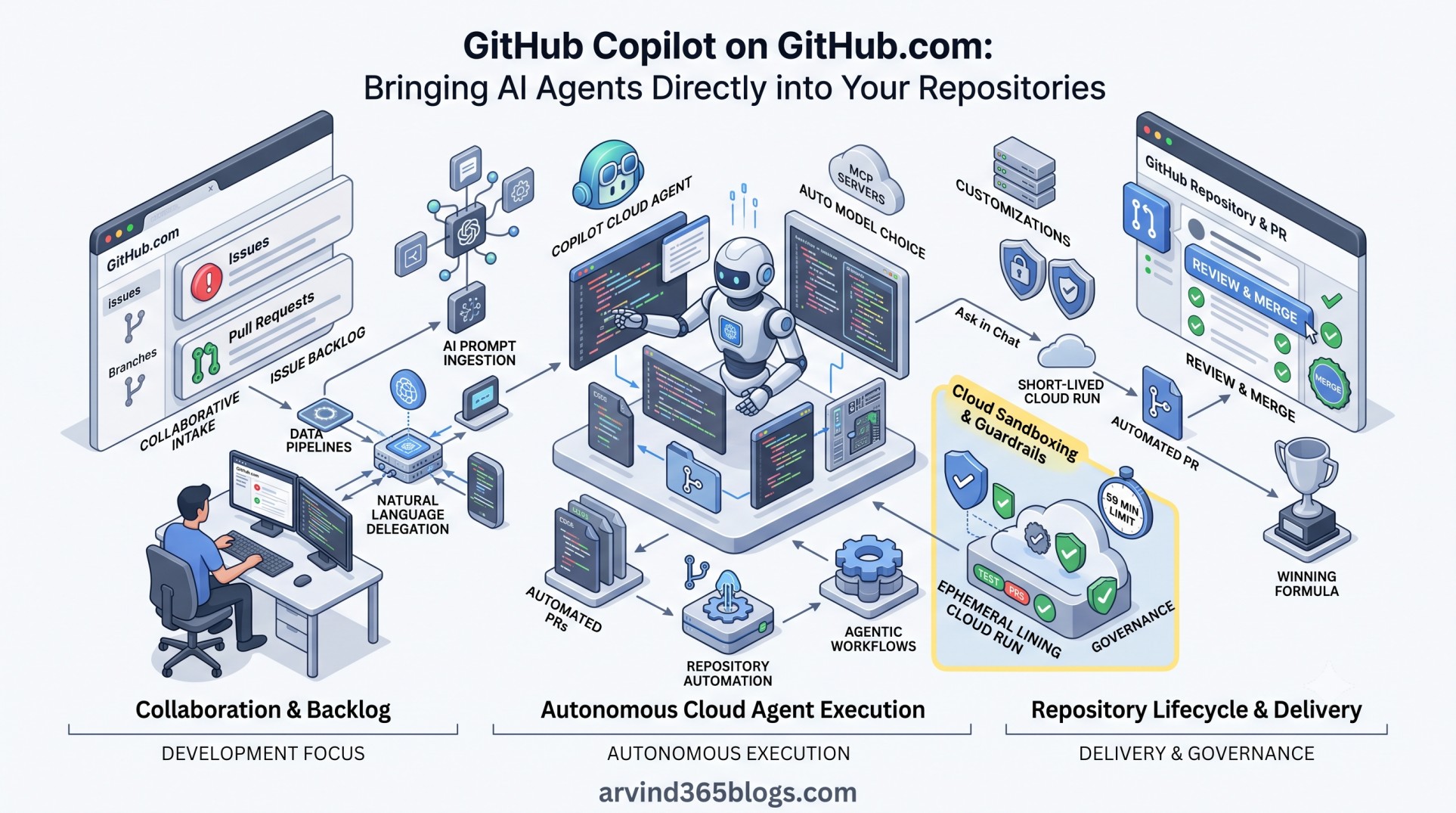
Ask in Chat → Delegate to Cloud Agent → Short-lived Cloud Run → Automated PR → Review & MergeYou can ask Copilot to explain how an authentication module works and then immediately instruct it: “Add missing integration tests and open a draft PR.”
Four Pillars of GitHub Copilot on GitHub.com
1. Copilot Cloud Agent
Unlike local completions, Copilot cloud agent operates in an isolated, ephemeral cloud development container. It researches the repository, plans modifications, creates a dedicated branch, edits code, runs test suites and linters and pushes commits in the background. You can kick off tasks directly from the Agents panel, an existing issue, or even from code scanning alerts during security campaigns.
2. Agentic Code Review
Copilot code review reviews pull request changes, identifies potential issues and suggests fixes using context from the repository. It can also generate a summary of the changes to help reviewers understand the pull request.
3. Repository Automations & Agentic Workflows
Copilot automations can handle recurring work without requiring a new manual prompt each time. You can set up scheduled or event-driven tasks - such as triaging incoming issues, auditing deprecated dependencies or checking test coverage. GitHub Agentic Workflows provide another approach: tasks can be defined in Markdown files and run through GitHub Actions with supported coding agents.
4. Unified Context & Cross-Surface Sync
Session context can be carried between Copilot Chat and delegated agent tasks. GitHub also provides visibility into synced session history across supported Copilot surfaces. With remote control enabled, certain Copilot CLI sessions can be monitored and steered from GitHub.com.
Customization and Enterprise Governance
To ensure agents adhere to team standards, GitHub provides extensive customization options:
- Custom Instructions, Spaces & Customization: Define repository conventions, architectural guidelines and organizational policies so agents can follow consistent team standards.
- Model Context Protocol (MCP): Extend agent capabilities with MCP servers to connect external systems, documentation and specialized tools into the workflow.
- Multi-Model Choice: Select from supported models depending on the task, such as lightweight coding, refactoring or more complex reasoning.
- Public Code Matching: Built-in detection checks generated code against public repositories, providing licensing references so teams protect intellectual property.
Guardrails and Practical Boundaries
Autonomous execution requires clear boundaries. GitHub built deliberate constraints into the cloud agent architecture:
Execution Limit: 59 min max per run
Scope: Repository and branch context defined for each task
Governance: Respects branch protection & bypass rulesets
Each cloud agent session has a maximum execution time of 59 minutes. Complex initiatives should therefore be broken down into discrete, focused steps.
Why This Matters from a Product Perspective
From a software architecture and product leadership perspective, this represents a fundamental evolution in software delivery.
We are progressing from:
“AI as a typing assistant” → “AI as a collaborative teammate” → “AI as a delivery agent”
When AI can work from an issue, make changes in a cloud development environment, produce a pull request and support automated checks, engineering bandwidth can be redirected toward strategic architecture, domain modeling and user experience.
Automating the mechanics of code delivery does not eliminate human responsibility - it elevates the engineer from a code typist to an architectural reviewer and systems orchestrator. AI-generated changes should still be reviewed and tested before they are used in production.
Final Thoughts
GitHub Copilot on GitHub.com shifts AI from personal workstation productivity to team-level engineering velocity.
By connecting natural language prompts to cloud agents, repository automations and pull request reviews, development workflows can become more continuous, transparent and collaborative - while keeping human review and approval in the loop.
The winning formula remains unchanged: 🏆
Delegate repetitive implementation to AI agents in the cloud, but keep human expertise, system architecture and final approvals at the center of your engineering culture.