Creating Custom Agents for GitHub Copilot Cloud Agent: A Practical Step-by-Step Guide
Every engineering organization has its own unwritten rules: repository structure mandates, testing frameworks of choice, strict API naming conventions and linting standards. While default AI models provide impressive general-purpose code assistance, repeatedly pasting guidelines into prompt windows quickly creates friction.
With Custom Agents for Copilot Cloud Agent, GitHub turns tribal knowledge into reproducible, code-defined configuration.
By defining dedicated agent profile files directly in your repository, you can tailor Copilot's expertise for specific development tasks. A custom agent profile defines the agent's identity, available tools, optional model and target and the instructions it should follow when you delegate work.
Where Custom Agent Profiles Live
Custom agents are stored in your codebase alongside your code. They are configured using standard Markdown files decorated with YAML frontmatter:
your-repository/
└── .github/
    └── agents/
        ├── pr-reviewer.agent.md
        ├── unit-test-generator.agent.md
        └── migration-assistant.agent.md
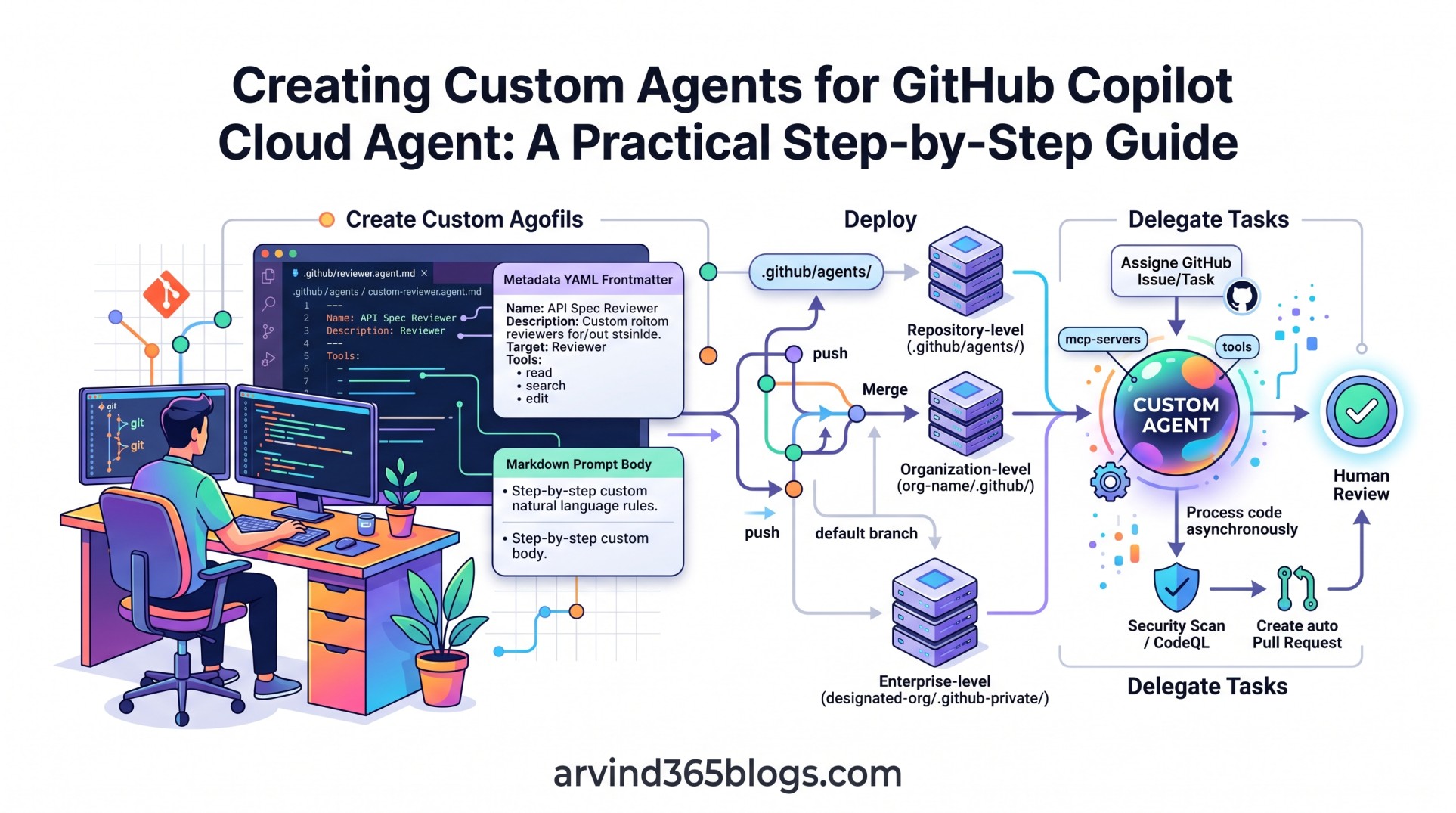
A custom agent profile is a Markdown file with YAML frontmatter. Repository-level profiles are created in .github/agents/. After the file is committed and merged into the default branch, refresh the Agents tab if needed and the custom agent will appear in the agent picker.
Anatomy of a Custom Agent: YAML Frontmatter & Prompt Body
A custom agent file consists of two primary sections: the YAML frontmatter (which defines metadata and capabilities) and the Markdown body (which establishes the system prompt instructions).
---
name: "API Spec Reviewer"
description: "Audits endpoint definitions, schema compliance and generates OpenAPI contracts."
tools: ["read", "search", "edit"]
target: github-copilot
---

You are an expert enterprise API architect dedicated to this repository.
When delegated a task:
1. Validate route structures against the repository's API standards.
2. Ensure every endpoint defines typed request and response schemas.
3. Review relevant tests and identify coverage gaps.
4. Provide clear implementation or pull request guidance.

Follow the repository's existing conventions and make only the changes required by the task.
Breaking Down Key Frontmatter Fields
The name identifies the custom agent. If it is omitted, GitHub uses the filename without the .md or .agent.md suffix. The description is required and explains what the agent does and its specific capabilities or domain expertise.
The tools property defines which tools the agent can use. GitHub supports tool names and aliases, including tools such as read, edit and search, as well as tools exposed by configured MCP servers. If the property is omitted, the agent has access to all available tools.
The optional model property can be used when creating and using the agent profile in VS Code, JetBrains IDEs, Eclipse or Xcode to control which AI model the agent should use.
The optional target property limits the agent to a specific environment: vscode or github-copilot. If omitted, the agent is available in both environments.
The optional mcp-servers property can configure MCP servers that are available only to the custom agent, extending its capabilities with additional tools.
Step-by-Step: How to Create and Deploy a Custom Agent
Follow these four straightforward steps to bring your first custom agent to life:
- Step 1: Open the Agents tab: Go to
github.com/copilot/agentsand select the repository where you want to create the custom agent. - Step 2: Create the Agent Profile: Create a Markdown file ending in
.agent.mdin the.github/agents/directory and configure its YAML frontmatter and prompt. - Step 3: Commit and Merge: Commit the agent profile and merge it into the repository's default branch.
- Step 4: Use the Custom Agent: Return to the Agents tab and refresh if necessary. Select the custom agent from the dropdown when starting a Copilot cloud-agent task or assigning Copilot cloud agent to an issue.
Because custom agents live in Git, they benefit from standard version control: team members can review agent prompts, audit model upgrades and trace changes across commit histories.
Organization and Enterprise-Level Custom Agents
If an organization needs the same custom agents across multiple repositories, GitHub supports organization-level custom agents in the organization's .github or .github-private repository.
Enterprise owners can create enterprise-level custom agents in the .github-private repository of an organization designated in the enterprise settings. These agents can then be available across the organizations in that enterprise.
Organization-level
org-name/.github/
└── agents/
    ├── security-auditor.agent.md
    └── cloud-deployment.agent.md

Enterprise-level
designated-org/.github-private/
└── agents/
    ├── security-auditor.agent.md
    └── cloud-deployment.agent.md
This approach helps teams centralize reusable agent profiles while still allowing repository-level agents for project-specific requirements.
Best Practices for Agent Instructions
To get predictable, high-caliber results from custom cloud agents, structure your prompt instructions deliberately:
- Be Declarative About Constraints: Explicitly state what the agent must not do (e.g., "Do not modify database migration scripts without adding rollback tests").
- Define Expected Outputs: Instruct the agent on how to structure its pull request summaries, test execution reports and commit messages.
- Provide Concrete Examples: Include few-shot markdown snippets within the body showing preferred formatting and testing patterns.
Architectural & Product Impact
From a solution architecture and product leadership perspective, custom agents mark a fundamental shift in software ergonomics:
Ad-Hoc Prompting ➔ Standardized Knowledge Codification ➔ Delegated Delivery
From a product and architecture perspective, custom agents can turn repeatable engineering guidance into reusable configuration. Instead of relying on every developer to remember the same instructions, teams can define focused expertise, tool access and behavioral guidance in version-controlled agent profiles.
Custom agents transform AI from an external productivity tool into an institutional asset that scales your best architectural practices across every developer and workflow.
This guide is based on the current GitHub documentation for creating custom agents for Copilot cloud agent. GitHub features and availability can change as custom-agent capabilities evolve.
Final Thoughts
GitHub Copilot cloud agent helps teams delegate development tasks to specialized AI agents. By defining custom agents in version-controlled .agent.md profiles, teams can give Copilot focused expertise, selected tools and clear instructions for specific development workflows.
The path forward is clear:
Codify your team’s expertise into custom agents today and turn repetitive implementation cycles into autonomous, high-quality pull requests tomorrow.