October 8, 2026 | GitHub Copilot | AI | Developer Productivity | 5 min read
Best Practices for Using GitHub Copilot: Getting More Value from Your AI Coding Partner
AI coding assistants are becoming a normal part of software development. GitHub Copilot can help developers write code faster, create tests, understand existing code and reduce repetitive work.
But getting value from an AI coding assistant is not simply about asking it to write code.
The quality of the result depends heavily on how we use the tool, how much context we provide and how carefully we review what it produces. GitHub's best-practice guidance provides a simple framework for doing this effectively.
1. Understand what Copilot does well
GitHub Copilot is particularly useful for tasks such as writing tests, generating repetitive code, debugging syntax, explaining code, adding comments and creating regular expressions.
These are areas where an AI assistant can save significant development time without removing the developer from the process.
At the same time, Copilot is not a replacement for developer expertise. The developer remains responsible for understanding the problem, making technical decisions and deciding whether a generated solution is appropriate.
Use Copilot to accelerate your thinking and implementation - not to replace your thinking.
2. Choose the right Copilot experience
One practical best practice is to choose the Copilot capability based on the task.
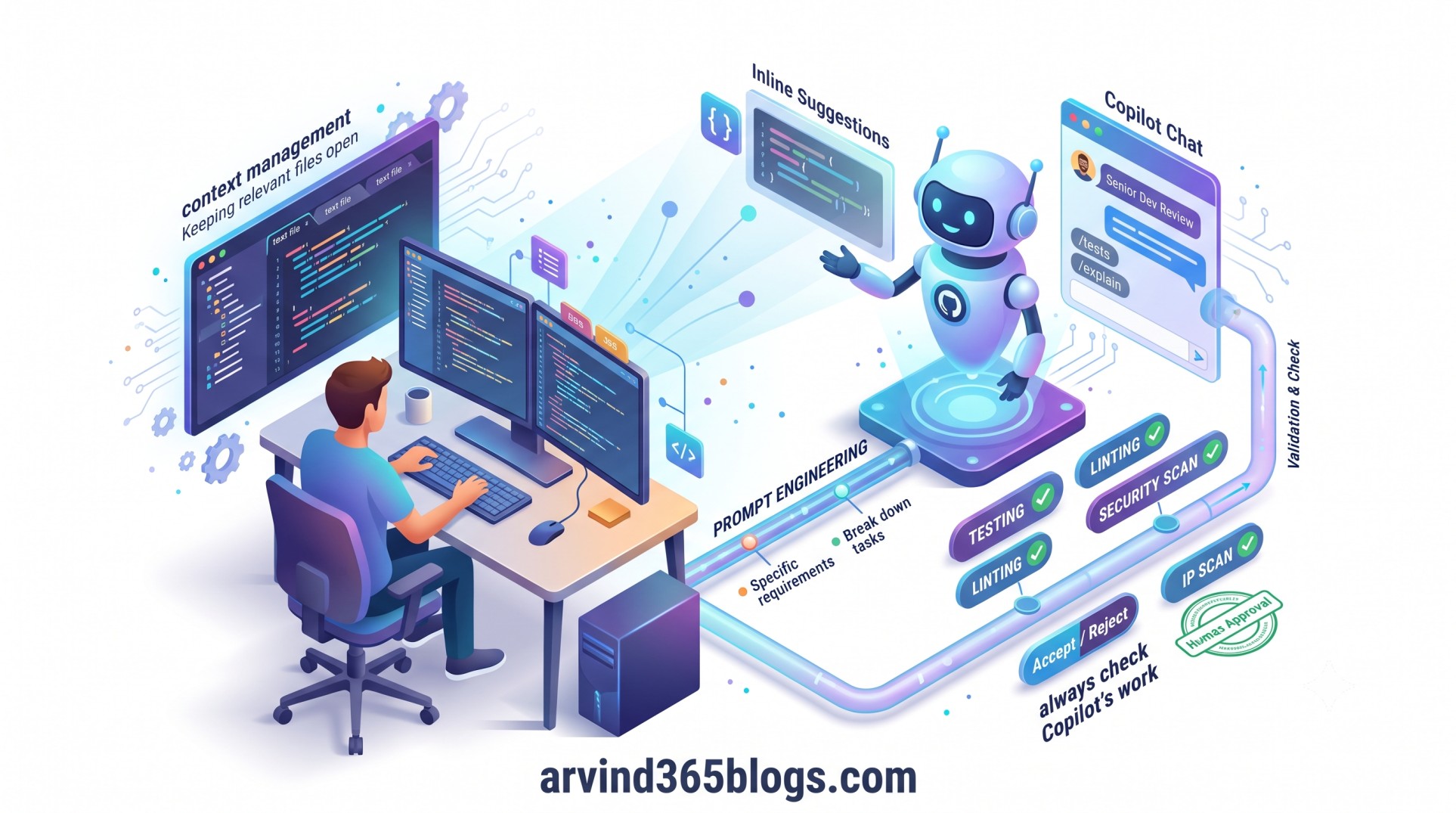
Inline suggestions
These are useful while writing code. They can help complete functions, variable names and code snippets, generate repetitive code, turn natural-language comments into code and create tests.
Copilot Chat
Chat is more useful when the task requires a conversation. You can ask questions about existing code, generate larger sections of code, iterate on an implementation or ask Copilot to review code from a particular perspective.
The simple idea is:
Small coding task → Inline Suggestions
Complex question → Copilot Chat
Code review → Copilot Chat + Developer Validation
3. Write better prompts
Prompt quality has a direct impact on the usefulness of Copilot's response.
Instead of asking:
"Write a function."
provide more context about what the function should do, the expected input and output, constraints and examples.
GitHub recommends four simple practices:
- Break complex tasks into smaller tasks.
- Be specific about your requirements.
- Provide examples of inputs, outputs or implementations.
- Continue following good coding practices.
For me, this is one of the most important lessons when working with AI: better context usually leads to better collaboration.😊
4. Give Copilot the right context
Context matters just as much as the prompt itself.
When working inside an IDE, keep the relevant files open and avoid providing unnecessary files as context. In Copilot Chat, remove conversation requests that are no longer useful. If a conversation has accumulated too much unrelated context, starting a new conversation can produce a more focused response.
When working in GitHub, you can also provide specific repositories, files and symbols as context. The goal is simple:
Relevant Context → Clear Prompt → Better AI ResponseIf the first answer is not useful, don't immediately assume that Copilot cannot solve the problem. Try rewriting the prompt or divide the problem into smaller questions.
5. Always check Copilot's work
This is probably the most important practice.
Copilot can generate useful code, but it can also make mistakes. Generated code should be understood and reviewed before it becomes part of a production solution.
Check the suggestion from multiple perspectives:
- Does it solve the actual requirement?
- Is the implementation secure?
- Is the code readable and maintainable?
- Does it follow the project's coding standards?
- Does it work correctly with the existing architecture?
Automated tooling adds another layer of confidence. GitHub recommends using practices such as testing, linting, code scanning and IP scanning to validate Copilot's output.
AI can generate the code. The engineering team is still responsible for the code.
6. Guide Copilot instead of accepting the first answer
Copilot may provide more than one inline suggestion. When that happens, compare the alternatives instead of automatically accepting the first one.
The same principle applies to Chat. If the answer is not what you need, refine the prompt, provide additional context or break the task into smaller steps.
You can also provide feedback through accepting or rejecting inline suggestions and using feedback controls for Copilot Chat responses. This helps create a more interactive development experience.
7. Keep learning as Copilot evolves
AI development tools are changing very quickly. New Copilot capabilities, features and workflows are introduced regularly.
That means learning how to use Copilot should not be a one-time activity. Developers and teams should keep an eye on new capabilities and understand how they can fit into their development process.
A developer who learns both software engineering and AI-assisted development can gradually build a much more effective workflow.
My practical Copilot workflow
Based on these practices, I would keep the daily workflow simple:
Understand → Prompt → Provide Context → Generate → Review → Test → RefineThe important point is that Copilot is part of the workflow, not the workflow itself.
For example, when building a new feature, I can use Copilot to explore an implementation, generate repetitive code and create tests. But the product requirement, architecture, business rules and final technical decision still need human ownership.
Why this matters from a product perspective
From a product perspective, I see GitHub Copilot as more than a developer productivity tool.
When used correctly, it can reduce the effort spent on repetitive development activities and give teams more time for problem solving, design, collaboration and delivering customer value.
But productivity should not be measured only by how quickly code is generated.
The real value is:
AI Speed + Engineering Quality + Human Judgment = Sustainable ProductivityFinal thoughts
GitHub Copilot can make software development faster and more collaborative, but the best results come when we treat it as an AI coding partner rather than an automatic code generator.
Start with the right task. Choose the right Copilot experience. Write clear prompts. Provide relevant context. Review every important suggestion. Test the result. And keep learning as Copilot evolves.
The key idea is simple:
Let Copilot help you write code faster, but keep your engineering judgment in the driver's seat.
That balance between AI assistance + engineering discipline + human judgment is what can turn GitHub Copilot from a useful tool into a valuable part of the modern software development workflow.