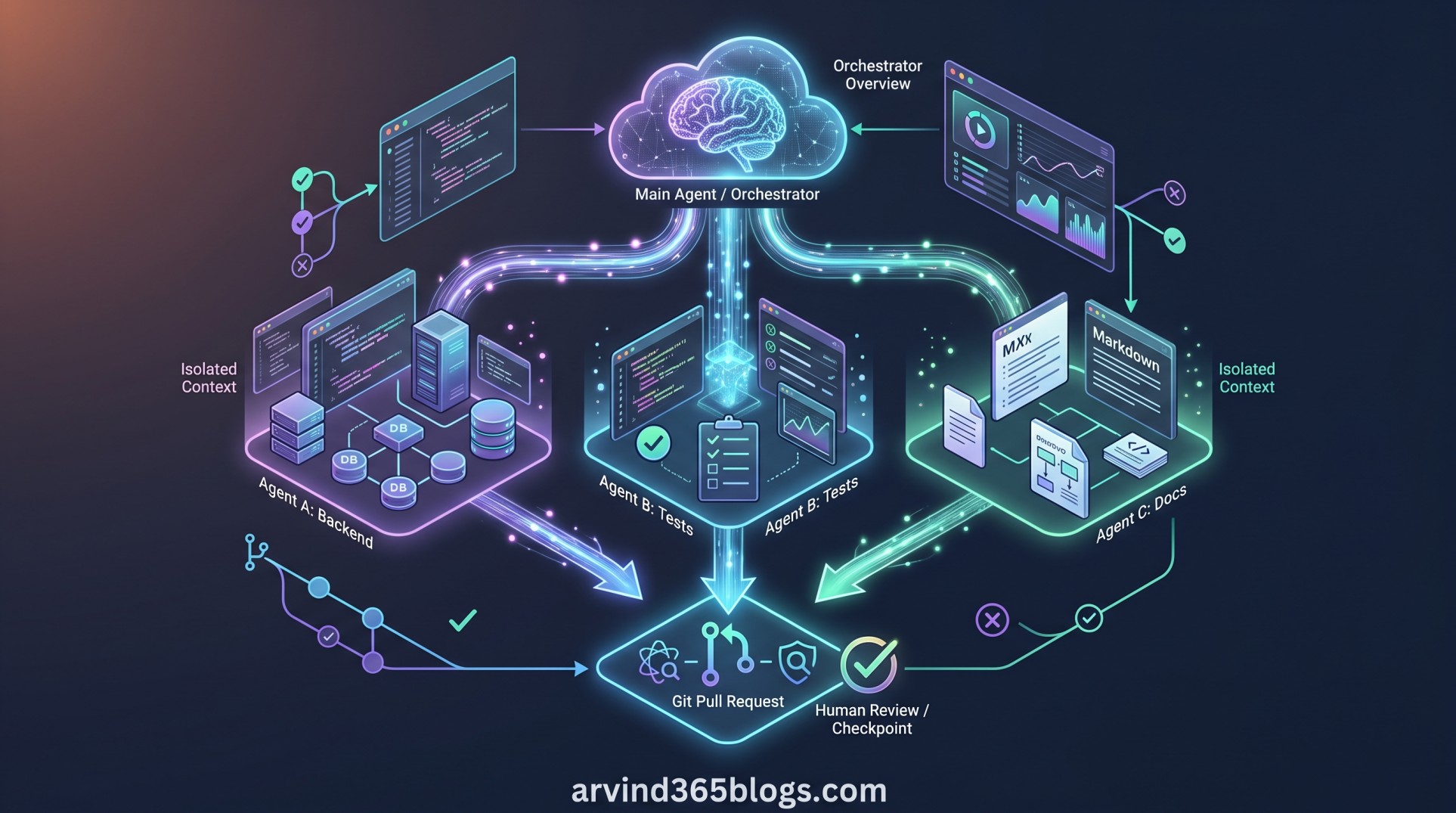
Delegating and Parallelizing Work with Agents: From One AI Agent to an Agent Team
As AI coding agents become capable of handling larger software engineering tasks, the challenge is no longer simply asking an agent to write code. The next step is deciding how a complex objective should be divided, delegated, executed and reviewed.
GitHub Copilot introduces a multi-agent approach for this scenario. Instead of making one agent handle every part of a large task sequentially, an orchestrator can break the work into focused subtasks and delegate suitable work to multiple agents.
This approach is especially useful when parts of the work are independent and can progress at the same time. GitHub documents this capability through the /fleet command in the GitHub Copilot app and GitHub Copilot CLI.
What Does Delegating Work with Agents Mean?
In a multi-agent workflow, there is typically an orchestrator that keeps track of the overall goal. The orchestrator is usually the main agent, which decides how the work can be divided and which subtasks are suitable for delegation.
The idea is simple: instead of giving one agent a large, mixed responsibility, give specialized agents clearly defined pieces of work and then bring their results together.
                    Overall Development Goal
                              │
                              ▼
                    Main Agent / Orchestrator
                              │
                 ┌────────────┼────────────┐
                 ▼            ▼            ▼
             Agent A       Agent B       Agent C
            Backend       Tests/QA      Documentation
                 │            │            │
                 └────────────┼────────────┘
                              ▼
                    Review & Combine Results
GitHub describes a coordinated workflow around five activities: break the goal into smaller tasks, identify dependencies, assign each task to a subagent with the required context and tools, run independent tasks in parallel and finally review and combine the results.
Why Use Multiple Agents?
Not every task needs multiple agents. The strongest use cases are tasks where the work is large, complex and naturally divisible into independent pieces.
For example, a large refactoring effort may involve updating several files, changing dependencies and running tests across different modules. These activities can potentially be separated into focused subtasks.
If subtasks do not depend on each other, multiple agents can work on them at the same time rather than waiting for one task to finish before starting the next.
Delegation can be useful when you want the quickest possible completion of a large task, particularly when Copilot is working autonomously.
These scenarios align with GitHub's guidance for when delegation provides the most value.
How /fleet Works
The /fleet command is available in the GitHub Copilot app and GitHub Copilot CLI. When used, the main Copilot agent analyzes the prompt and determines whether the request can be divided into smaller subtasks.
It considers the nature of those subtasks and their dependencies. If delegation makes sense, the main agent becomes the orchestrator and manages the resulting workflow.
/fleet

Main Agent
   │
   ├── Analyze the request
   ├── Identify subtasks
   ├── Check dependencies
   ├── Delegate suitable tasks
   │
   ├── Agent A ──► Task 1
   ├── Agent B ──► Task 2
   └── Agent C ──► Task 3
              │
              ▼
       Orchestrator reviews
       and combines results
Where possible, the orchestrator runs subagents in parallel. Each subagent also has its own context window, allowing it to concentrate on its assigned task instead of carrying the entire context of the main session.
Planning Before Delegation
Good delegation starts with good task decomposition. For a complex request, planning first can clarify the desired outcome, expose dependencies and create sensible task boundaries.
GitHub's documentation points to the /plan slash command as a way to shape this breakdown before using fleet mode to delegate suitable subtasks.
/plan

Goal:
Modernize the customer portal

Potential breakdown:
1. Analyze current architecture
2. Update API layer
3. Refactor UI components
4. Add automated tests
5. Update documentation

After dependencies are understood:
Use /fleet for suitable independent tasks.
The important point is that planning and parallelization are complementary. Planning helps determine what should be done and in which order; fleet mode can then determine which parts can be delegated and executed concurrently.
The Benefits of a Multi-Agent Workflow
Independent tasks can make progress simultaneously instead of waiting for sequential execution.
Each agent can focus on a bounded task with the context relevant to that task.
Different subtasks can be assigned to custom agents or models that are better suited to particular types of work.
GitHub identifies these as key benefits of using multiple agents.
Parallel Does Not Always Mean Better
Multi-agent development also introduces an important trade-off: more agents mean more model interactions. GitHub notes that using subagents can increase AI usage and therefore may consume more GitHub AI Credits.
There is also a task-design consideration. Parallel execution is most valuable when the tasks are genuinely independent, their boundaries are clear and the coordination cost is lower than the time saved.
If a task is inherently sequential, adding more agents may add coordination overhead without creating a meaningful speed advantage.
This is an important architectural principle. Before creating an agent team, first ask: Can these tasks really progress independently?
A Practical Example
Imagine a product team asks Copilot to modernize a web application. The overall request is too broad for a single focused activity, but several parts can potentially be separated.
Objective: Modernize the application

Orchestrator
│
├── Agent 1: Analyze backend dependencies
│
├── Agent 2: Review frontend components
│
├── Agent 3: Identify missing automated tests
│
└── Agent 4: Review documentation
        │
        ▼
   Orchestrator
   reviews results
        │
        ▼
   Integrated implementation
   + validation
The example is illustrative rather than a prescribed GitHub workflow. The key idea is to create clear boundaries, identify dependencies and only parallelize the pieces that can safely proceed independently.
What This Means for Product and Engineering Teams
From a product and technology leadership perspective, multi-agent development changes the way we can think about AI-assisted delivery.
The focus moves from "How do I prompt the AI to do everything?" to "How should the work be decomposed so AI agents can collaborate effectively?"
Break a large outcome into clear deliverables, define acceptance criteria and identify dependencies before delegation.
Create well-bounded technical tasks so agents can work independently without unnecessary context or conflicting changes.
Treat the main agent as an orchestrator and specialized agents as focused execution units, with review and integration remaining essential.
The future of AI-assisted software development is not necessarily one powerful agent doing everything. It can be an orchestrated team of focused agents working on the right pieces of a larger problem.
Final Thoughts
Delegating and parallelizing work with agents is a natural progression from single-agent AI assistance toward AI-powered software delivery orchestration.
GitHub's multi-agent approach provides a practical model: understand the overall goal, break it into smaller tasks, identify dependencies, delegate suitable work and allow independent tasks to run in parallel. The orchestrator then brings the results back together for review.
The real value is not simply having more agents. It is knowing when to delegate, what to delegate and when not to parallelize.
Plan the work. Define clear boundaries. Delegate independent tasks. Let agents specialize. Then review and integrate the result.