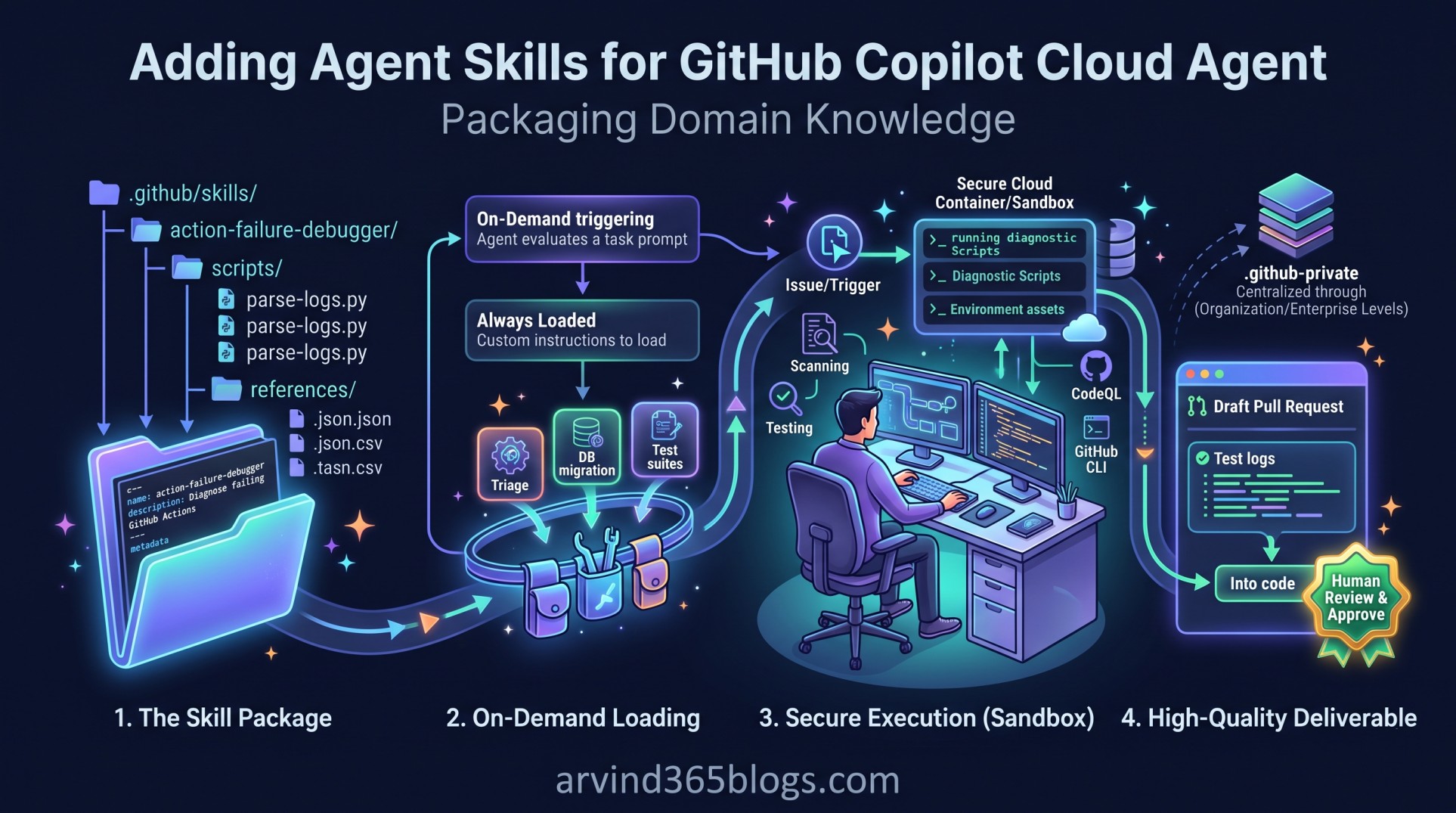
Adding Agent Skills for GitHub Copilot Cloud Agent: Packaging Domain Knowledge
As autonomous AI agents take on more substantive software engineering responsibilities, prompt engineering alone begins to hit fundamental limitations. Giving an agent broad instructions such as “run tests and fix failures” often falls short when real-world execution requires multi-step triage runbooks, diagnostic scripts or domain-specific lookups.
With Agent Skills for GitHub Copilot Cloud Agent, GitHub introduces a modular way to package capabilities. Instead of writing monolithic system prompts, developers can structure domain expertise into self-contained, on-demand skill packages.
Agent skills bundle structured guidance, executable scripts and reference documentation into dedicated directories. When Copilot cloud agent operates in its isolated cloud container, it dynamically loads and executes these skills whenever your task prompt calls for them.
What Is an Agent Skill?
An agent skill is a self-contained capability directory designed to teach Copilot how to execute a specialized, repeatable procedure. While custom agents define an overall agent persona, agent skills provide the discrete playbooks and tools that any agent can pull from its utility belt.
Custom Agent (The Persona / Who)
       ↓
Agent Skills (The Capabilities / What & How)
   ├── SKILL.md (Instructions & Triggering Logic)
   ├── Scripts (Executable Automation)
   └── References (Schemas, Examples & Data)
Skills allow the cloud agent to perform specialized tasks - such as triaging a complex CI/CD pipeline failure, running schema migrations, generating accessibility audits or formatting release notes - with deterministic accuracy.
Directory Structure and Layout
Skills live directly inside your repository version control under the .github/skills/ directory. Each individual skill resides in its own lowercase, hyphenated subfolder containing a mandatory SKILL.md file alongside any auxiliary assets:
your-repository/
└── .github/
    └── skills/
        └── action-failure-debugger/
            ├── SKILL.md                # Mandatory: YAML frontmatter & markdown guidance
            ├── scripts/                # Optional: Executable automation
            │   └── parse-logs.py
            └── references/             # Optional: Schemas, guidelines & examples
                └── error-codes.json
Authoring the SKILL.md File
The heartbeat of an agent skill is the SKILL.md file. It combines YAML frontmatter (for metadata, triggering conditions and pre-authorized tools) with procedural markdown instructions for the AI model:
---
name: "action-failure-debugger"
description: "Diagnose failing GitHub Actions workflow runs and extract root failure logs."
allowed-tools:
  - "run-command"
  - "read-file"
---

When tasked with diagnosing a failing GitHub Actions run:
1. Identify the latest failed run using the GitHub CLI:
   `gh run list --limit 3 --json databaseId,status,conclusion`
2. Download the failure log to the container:
   `gh run view --log-failed > /tmp/workflow-failure.log`
3. Execute the diagnostic script to isolate the traceback:
   `python3 ./scripts/parse-logs.py /tmp/workflow-failure.log`
4. Summarize the root cause, identify the offending line of code and open a draft PR with the fix.
Key Frontmatter Fields Explained
A unique, lowercase identifier for the skill (using hyphens for spaces). This allows both developers and other subagents to reference the skill explicitly.
A clear explanation of what the skill does and under what conditions it should be invoked. Copilot evaluates this description against user prompts to determine if the skill should be loaded dynamically.
Defines the specific set of tools or commands pre-approved for this skill. This ensures that the cloud agent has immediate authorization to run scripts or read files needed to fulfill the playbook without hitting permission pauses.
Skills vs. Custom Instructions: What's the Difference?
It is easy to confuse agent skills with custom repository instructions (such as copilot-instructions.md). However, they serve very different architectural purposes:
Always loaded in every session. Best for universal rules, such as preferred programming languages, global formatting conventions and broad codebase architecture patterns.
Loaded on-demand only when relevant. Best for task-specific procedures, multi-step runbooks and bundled scripts that would otherwise bloat the context window if loaded globally.
Enterprise Distribution via .github-private
Just like custom agents, skills can be managed at scale across large enterprise teams. Rather than duplicating skill folders into hundreds of microservice repositories, organizations can centralize standard skills:
org-name/.github-private/
└── skills/
    ├── database-migration-validator/
    └── security-incident-triage/
            ↓
Inherited and executable across all organization repositories
Centralizing enterprise runbooks inside a .github-private repository guarantees that all teams follow verified compliance, testing and debugging playbooks while minimizing maintenance overhead.
Architectural & Product Leadership Impact
From a technology leadership and system architecture perspective, agent skills solve one of the biggest challenges in autonomous AI: context efficiency and reproducibility.
Software delivery matures from:
Unstructured Prompting ➔ Custom System Instructions ➔ Modular, Executable Skill Packages
By packaging complex multi-step workflows into version-controlled skills, senior engineers can codify how incidents are investigated, how migrations are conducted and how tests are generated. The AI cloud agent doesn't guess - it follows your company's battle-tested runbooks in an ephemeral, secure sandbox.
Agent skills transform passive documentation into active, executable engineering capability. Your operational runbooks stop gathering dust in wikis and start executing directly inside your pull requests.
Final Thoughts
Adding agent skills for GitHub Copilot Cloud Agent elevates AI delegation from open-ended conversations into disciplined, structured workflows.
By combining SKILL.md playbooks with dedicated scripts and reference datasets, teams build a scalable library of institutional knowledge that powers autonomous, high-quality software delivery.
The formula for autonomous excellence:
Codify your critical procedures into modular skills, version-control them in Git and empower Copilot Cloud Agent to execute complex workflows with consistent precision.