January 2, 2026 | Power Apps | 7 min read
Power Apps Wave 2: Create Offline Profiles in Maker Studio for Canvas Apps
As mobile productivity becomes the norm, supporting disconnected scenarios is no longer optional, it’s essential. With the 2025 release wave 2, Microsoft is empowering makers to easily configure offline profiles for Canvas apps directly within Power Apps Maker Studio. This significantly streamlines the development of offline-capable mobile apps and removes reliance on admin-only tools.
What is the Offline Profiles Feature?
Traditionally, enabling offline support and defining offline sync behaviour for Canvas apps required makers to jump between Power Apps Studio and the Power Platform admin center. With this Wave 2 update, you can now:
- Create and edit offline profiles directly in Maker Studio
- Include app-specific data tables, sync intervals and which columns to sync
- Avoid the need of environment admin permissions to enable offline support
This speeds up iterations and empowers makers to deliver offline experiences faster and more efficiently.
How It Works (Step-by-Step)
Here’s how makers leverage this new offline profile capability:
- Open your Canvas app in Power Apps Maker Studio.
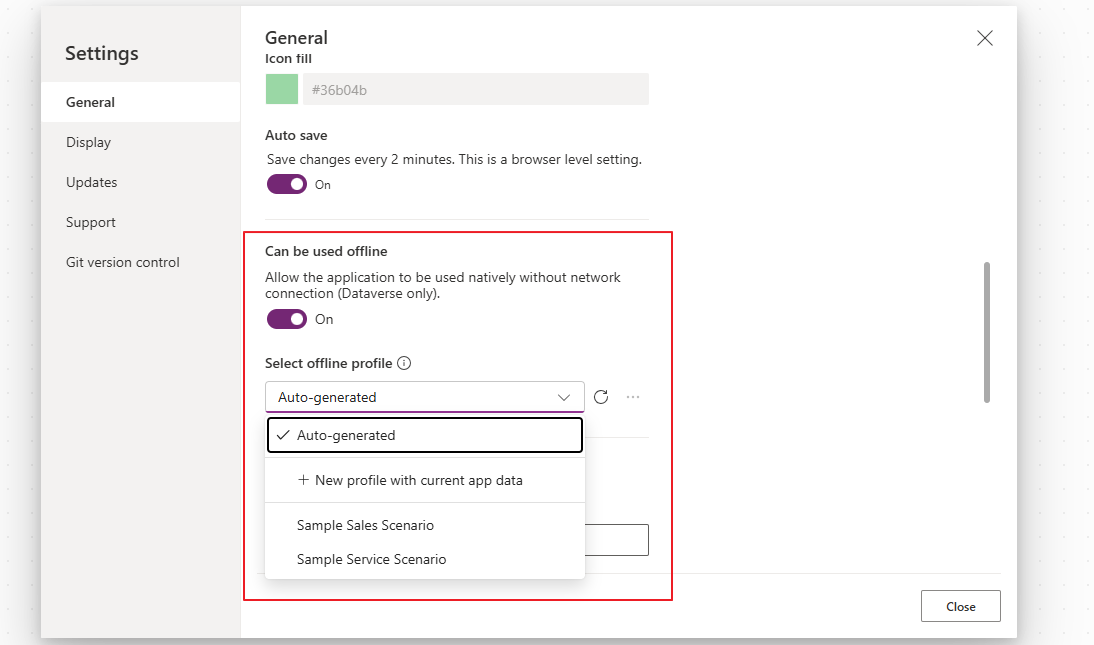
- Navigate to the Settings menu and toggle on Can be used offline.
- From the Select offline profile dropdown, choose:
- New profile with current app data to create a fresh offline profile, or
- An existing profile to edit and republish.
- Configure the profile, select tables, set sync intervals, define filters/columns and publish the profile.
Once published, the offline profile is automatically applied when users run the app in offline mode.
Why This Matters
Here’s why this feature is a big deal for makers and businesses:
👉 Fewer Permissions Needed
You no longer need environment admin access just to create offline experiences, makers can do it all within app settings.
👉 Faster Iterations
Defining offline behaviour is now part of the regular app build flow, reducing context switching and deployment delays.
👉 Better User Experience
Offline profiles let you decide exactly what data and how much of it gets downloaded to your users’ devices, improving sync performance and UX, especially in low-connectivity environments.
Offline in Power Apps: The Bigger Picture
Offline support has been a strategic focus in Power Apps for a while. Even before this 2025 Wave 2 feature, makers could enable offline support manually by configuring offline capabilities and defining profiles through the admin center. Those offline profiles determine what data the app stores locally when the user is offline and how syncing works when connectivity is restored.
What’s new in 2025 Wave 2 is maker-centric convenience, bringing this capability into the everyday canvas app development experience.
Conclusion
Offline capabilities are important for field-facing apps such as inspection activities, after sales service, offline sales scenarios and any use case where connectivity isn’t guaranteed. With the 2025 Wave 2 offline profile experience in Maker Studio, Power Apps makes it easier to build robust offline experiences without admin overhead, a big win for makers focused on delivering enterprise-grade mobile apps.
- Enabled for : Admins, makers, marketers, or analysts, automatically
- Public Preview : Sept 16, 2025
- General Availability: Dec 2025